

From the CollectHolo blog
Digimon TCG Tracker: Alt Art, Reprints and Your Collection
Turn a mixed Digimon collection into a record you can use. Separate card numbers, alternate art and reprints, log duplicate copies, and keep the cards you want on a wishlist.
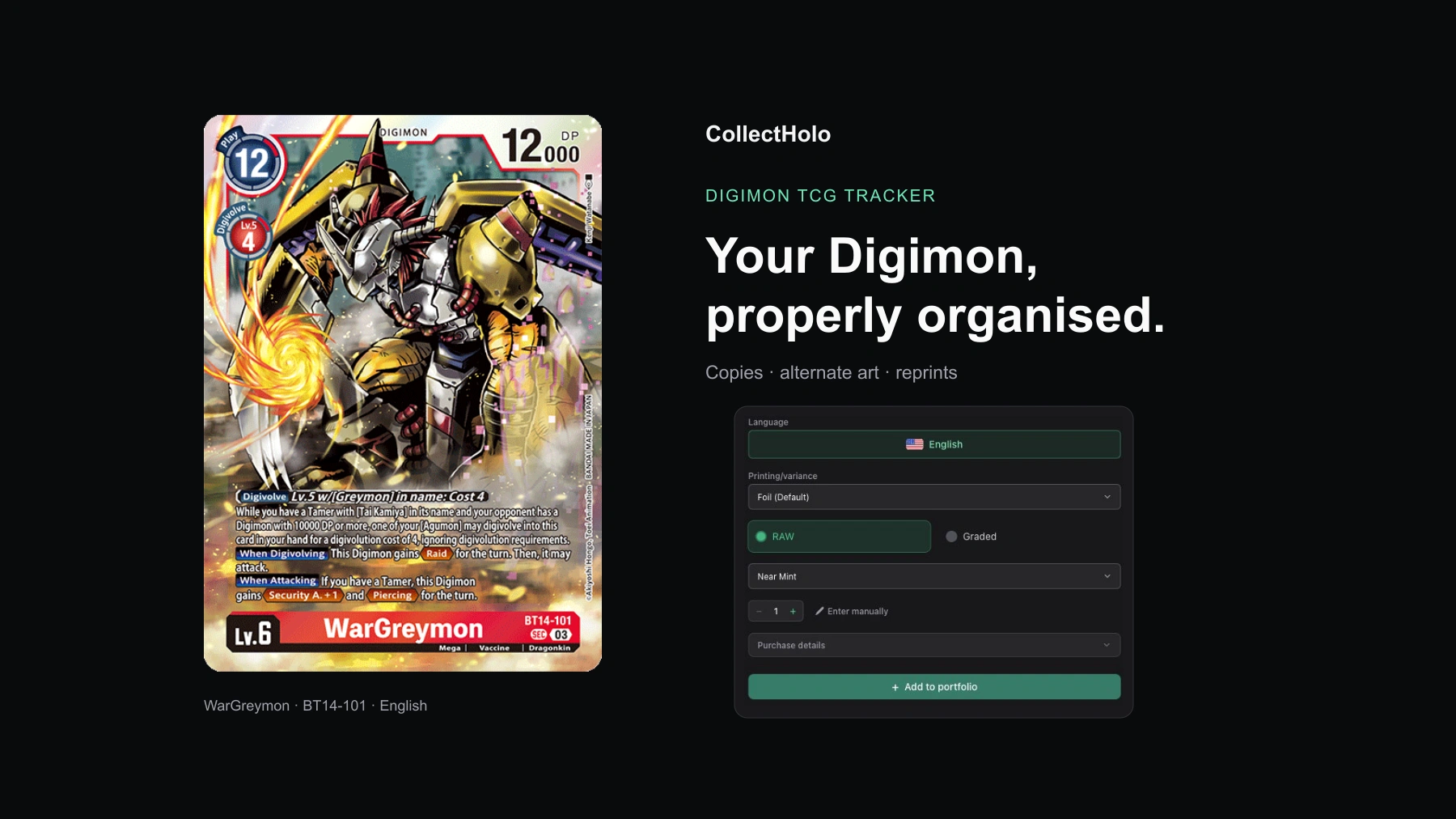
CollectHolo is a Digimon TCG tracker for organising owned cards, recording quantities and purchase details, separating collectible printings, and keeping a wishlist. Use Digimon Explore to find a card or sealed product, and the Digimon set directory to browse your collection by release.
A Digimon collection can spread across decks, binders and spare-card boxes long before it feels large. The awkward part is usually the overlap: several Agumon cards with different numbers, another artwork of a card you already own, or a reprint bought months after the original. A useful inventory keeps those distinctions visible.
“I own Agumon” is the beginning of the record
A character name does not identify a particular Digimon card. Bandai’s official Blast Ace deck examples include Agumon cards with different numbers, including ST7-02, BT12-059 and BT14-007. They share a name, but they belong in separate collection entries.
In CollectHolo, start with the printed card number and check the matching name and set. For example, Agumon BT14-007 has its own catalogue page within Blast Ace. Once you have found the card, check which printing matches the copy in your hand.
Keep three pieces of information together: card number, printing and quantity. That gives you a record you can use when sorting a binder, checking spare copies or considering another purchase.
Separate alternate art and reprints before counting duplicates
WarGreymon BT14-101 is a useful example. Its CollectHolo printing selector distinguishes the default Foil entry from Alternate Art and other catalogued versions, including a labelled reprint.
Bandai’s official promotional card list also shows why the number alone is not a complete description of a collectible copy: promotional versions can retain a familiar card number. Compare the artwork, finish and any promotional marking when selecting your entry.
Suppose you own three copies of one foil printing and one alternate-art copy. Record three under the foil printing and one under the alternate art. That preserves the total quantity while keeping the collectible versions distinct. Condition differences may also justify separate holdings.
The reverse mistake is easy too: two copies bought at different times do not become different printings merely because they came from different purchases. Use the purchase record to preserve that history.
Organise the collection around how you use it
A collection record is easier to maintain when it resembles your physical storage. You could keep binder cards, cards used in decks, and spare copies in separate portfolios, or organise by a favourite Digimon or collecting goal. These are choices for organising holdings, rather than an automatic deck-allocation system.
Sign into your CollectHolo account to save holdings. When adding a Digimon card, choose the destination portfolio, confirm its printing and condition, and enter the quantity. The card page’s Add to Portfolio dialog also offers purchase details, including a date, unit price, shipping, currency and notes.
For a card stored in a deck, a note such as the deck or storage-box name can make it easier to locate later. Keep the note current when you move the physical card. For broader collection organisation, see the portfolio guide.
Use sets to audit the cards you already own
The set directory is useful when a mixed collection needs a second pass. Choose a release such as Blast Ace and compare its checklist with the cards in front of you. The set view separates card progress from printing progress and offers All cards, Collected and Missing views.
Watch the release category as well as the title. CollectHolo lists main releases and related event-card groups separately; for example, Blast Ace Pre-Release Cards has its own set page. Checking that group can help you avoid treating an event version as the ordinary booster printing.
English product groupings can also span more than one numbered series. The directory includes Release Special Booster 2.0, labelled BT18-19. Read the set name and printing information together when working back from a card number.
Keep buying plans separate from owned quantities
Add the cards you still want to your wishlist. You might own an ordinary printing and still want its alternate art, or want another copy for a different deck. A wishlist records that intention without increasing the quantity you already own.
Before buying, revisit the card page and confirm the selected printing. Check the available marketplace information and history for that version, then match the seller’s copy by language, condition and artwork. Coverage varies: a price or history may be unavailable for a particular printing.
Your purchase cost and the displayed market reference are separate facts. Record the amount you paid in the correct currency and include shipping where appropriate. A seller’s asking price is not a completed-sale result or a guaranteed resale value. Additional purchase costs such as grading fees or customs are PRO features; other limits and advanced tools depend on your plan.
A practical first session: one box of spare cards
Start with a manageable stack. Sort by card number, separate the different printings, enter the quantities, and add a storage note if needed. Then check the relevant set pages and put the next additions on your wishlist.
You will finish with something more useful than a list of character names: a record of the copies you own, the versions you collect and the cards you still want.
Find your Digimon cards in CollectHolo or browse Digimon sets.
Features checked in the browser on 9 November 2026. CollectHolo is an independent collection tracker and is not affiliated with or endorsed by Bandai or the Digimon rights holders.